3DCoat ChangeLog
3DCoat 2026.22 HOTFIX
Sep 1 2026
- Fixed an issue where the Cavity effect would not apply when painting with Smart Materials, despite showing correctly in the preview.
- Fixed an occasional crash that could occur when clicking or interacting with the user interface.
- Fixed an issue where texture padding appeared black when multiple objects shared the same UV set.
3DCoat 2026.21 HOTFIX
Aug 31 2026
- The Merge Down, Merge Up, and Merge Selected commands now automatically bake your node-based procedural materials into standard textures when combining layers.
- Merge Visible now utilizes the GPU, enabling the ability to fully bake all node-based smart materials and their active PBR channels into a single layer.
- You can now use the Shift + V hotkey anywhere in 3DCoat to instantly sample a color directly from your screen.
- Fixed the Color Picker (Pipette) to accurately capture the pure, unlit Color, Metalness, and Gloss directly from your layers, resolving an issue where it would occasionally pick incorrect, darkened, or lit colors.
- Crash fixes
3DCoat 2026.20 HOTFIX
Aug 27 2026
- Fixed a bug in the Primitives tool where using the Lasso selection on the Free Form (FFD) cage would accidentally move a point and cause the tool settings to disappear.
- Fixed a crash that could occur when using the Undo command while editing primitives with the Free-Form Deformation (FFD) tool.
- Fixed a crash that occurred when typing a long search query into the tool search field in the Space Menu.
- Fixed a crash that occurred when trying to create a new Python or Core API script if the script templates folder is missing.
- Fixed an issue where uniform Metalness and Glossiness shader parameters failed to bake properly into textures, and corrected a bug that caused the baked colors to appear too dark.
- Fixed an issue where layer channel assignments were lost when loading a saved project (most commonly noticed when assigning the Color channel to Normals).
3DCoat 2026.19 HOTFIX
Aug 26 2026
- Fixed an issue with GLTF scene export when visible objects mode was disabled.
- Fixed "Specular Color only" and "Metalness only" view modes.
- Write "[floating, used X of Y]" to persistent log file "Documents\3DCoat202x\FloatingLicense.log" with ISO UTC timestamps
- Approximately 150 automated crash reports processed; a large number of crashes fixed.
- Fixed severe UI lag that occurred when tweaking node properties with sliders in Per-Pixel Painting mode.
- Fixed an issue where the final merged texture of paint layers would show an opaque white background in erased areas instead of being fully transparent.
3DCoat 2026.18 HOTFIX
Aug 12 2026
- Fixed an issue that caused a delay before the camera started rotating in the render room.
- Fixed an issue in the Node Editor where holding the CTRL key and hovering over a knot failed to display its preview on the 3D model.
- Fixed a GLB export issue that prevented the file from opening in a web browser.
- Write [floating, used X of Y] to Log.txt when floating license seat counts change
- Crashes fixed based on automatic crash reports.
3DCoat 2026.17 HOTFIX
Jul 30 2026
- Fixed mouse issues in the node editor.
- Fixed an issue in GPU PPP mode where Displacement maps exported as a flat solid grey image instead of rendering proper height details and padding.
- Fixed an issue in GPU PPP mode where exported Color/Albedo maps flooded the background with solid color instead of rendering proper edge padding with a transparent background.
- Fixed crash in NGPresetsWindow caused by texture resize in UpdateTexture when RenderTarget is explicitly passed
- Fixed model file selection from the startup dialog for MV and PTEX painting modes
- Fixed a Python installation error that caused 3DCoat Textura to launch without the main menu and tools.
3DCoat 2026.16 HOTFIX
Jul 28 2026
- Fixed an issue with installing Python modules when folder names contain spaces.
- Pre-installed AV library in Python
3DCoat 2026.15 HOTFIX
Jul 27 2026
- The default folder for 3DCoat Textura has been changed from 3DCoatTextura to 3DCoatTextura2026 to avoid version conflicts.
- Fixed an error in exporting to Blender when the script path parameter did not have quotes.
- Fixed an issue where unwanted trails appeared in the viewport when moving objects along an axis using a hotkey instead of the transform gizmo.
- Fixed an issue with color distortion in grouped painting layers.
- Fixed an issue where the layer list in the "Take Other Layer As Mask" menu duplicated every time it was opened.
- Fixed an issue where node-generated materials in Per-pixel Painting appeared dark.
- Remove debug information from NodeGraph
- Fix node baking with using the gizmo
- Matrix property type support in NodeGraph
- Fix minor bugs & crashes
- Restore hard glsl validation for NodeGraph
- Renamed the 'Vector' node category to 'Math' and moved organic textures from 'Pattern' into dedicated 'Noise' categories, while keeping all your existing projects fully compatible.
- Bake color, metall and gloss to voxels (volumetrics)
- Texture Loading ProgressBar
- Support for depth blending with underlying layers (GPU PPP)
3DCoat 2026.09 RC
Jul 20 2026
- Fixed an issue where shader previews would incorrectly render as black or solid white, ensuring that your custom color, gloss, metalness, and emissive settings are now accurately displayed.
- Procedural node-based materials now correctly respect layer color blend modes
- Selecting blending modes like Normal Map, Emissive, or Occlusion will no longer automatically change your selected Color Channel, while still rendering exactly as expected.
- When using the 'Convert To Object Nodes' menu item to convert old smart materials into nodes, textures like Color, Depth, and Gloss are now automatically created as separate, minimized UVW texture nodes and connected to the material, giving you more flexibility to edit them.
- Fixed print shader
- Fixed Emissive in PBM shader
- Fixed toon shader
3DCoat 2026.08 RC
Jul 19 2026
- Added the new inGizmoTransform node, which connects to the UVWTexture, TriPlanar, and FragCoord nodes to control texture position, rotation, and scaling.
- Selecting a node with transform properties now automatically spawns an interactive 3D Gizmo in the viewport, letting you visually move, rotate, and scale it in perfect, two-way sync with the node's numeric values.
- Fixed an issue in the node graph where a locked preview would prevent you from temporarily previewing other nodes by hovering over them with Ctrl pressed.
- Fixed a bug in orthographic projection where models would only update after releasing the brush stroke, as the camera's performance optimization incorrectly assumed the model was out of view.
- A Projection mapping mode has been added to the nodes.
- Resolved critical normal mapping issues on sculpt objects, ensuring that fine surface details are correctly preserved even when using Soft Displacement
- Support for matrix-type properties in the node system
- Bugs and crashes have been fixed.
- Added the highly requested 'Auto Pick' and 'Ghosted' options to the top bar in the Print3D room
- Significantly accelerated the rendering of node previews and channel viewing (via CTRL+hover), while eliminating lag, unnecessary loading popups, and fixing bugs with black material previews and layer masking.
3DCoat 2026.07 RC
Jul 13 2026
- Holding Ctrl over a knot in components with the NGVoxel behavior now correctly previews its effect on raymarching
- Added support for applying Node Graph presets from the NGVolumes category directly to volume objects, automatically creating the necessary Voxel layer if it doesn't already exist.
- Significantly accelerated the rendering of node previews and channel viewing (via CTRL+hover), while eliminating lag, unnecessary loading popups, and fixing bugs with black material previews and layer masking.
- Fixed an issue where a connection between knots could not be established on the first attempt.
- When saving a NodeGraph, the same category and folder used when loading it are suggested by default.
3DCoat 2026.06 RC2
Jul 12 2026
- Nodes have been sorted, and noise and patterns have been separated into different folders.
- Mandatory GLSL validation has been added after NodeGraph modifications.
- Node system support has been added to the free version of 3DCoat Print, allowing anyone to generate voxel objects and patterns.
3DCoat 2026.06 RC1
Jul 11 2026
- FFD: When "Transform/Lattice Toggle" is enabled it will automatically resize to perfectly fit your selection at the new angle.
- Updated the Smooth Selection algorithm to use a geometry-aware calculation (cotangent weights), which completely eliminates the cross-shaped artifacts along the object's axes and ensures a flawless, perfectly round gradient.
- The new 'Snap to Surface' option allows the Surface Strip tool to draw guide curves that automatically hug and conform to the underlying 3D sculpt, rather than floating on a flat plane.
- Fast GPU generation of 3D voxel patterns using the node editor directly on the voxel model.
- Added smooth fading curves and color-coded connection animations to the node editor, and significantly improved tablet drawing stability by ignoring accidental pen micro-bounces.
- Added the ability to smoothly zoom in and out of the node editor by holding Alt and dragging with the Right Mouse Button.
- Improved the node editor's visual contrast by darkening the background and adding distinct bright highlights to selected nodes, making it much easier to focus on your active selection.
- Fixed an issue where baking Local Curvature or Local Curvature RGB produced harsh, visible artifacts along UV seams.
- Node-based materials respect layer settings during per-pixel UV painting, such as the influence of depth, glossiness, and metallicity.
- Additional noise and pattern nodes from Carlosan have been added.
- Raymarching preview for generating procedural voxel models using a node-based system.
- Update the splash screen
- NodeGraph reading has been optimized.
- Crashes in various locations have been fixed.
- Clean FFD interface
- Fix GPU culling bug for quads with overlapping UVs during interactive painting
- Fix rendering for PTEX and Microvertex modes
- Fix node baking scale
- Fixed the scale when baking nodes onto the surface.
3DCoat-2026-05 Beta
Jun 26 2026
- Added the ability to display inline nodes in either minimized or standard form.
- Added new Auto Conform Mesh tool that allow users to effortlessly snap the FFD cage to underlying geometry and perfectly wrap models over complex surfaces without penetration.
- The Pose tool's FreeForm deformation now features mathematically accurate Linear, B-Spline, Bezier, and Catmull-Rom volume interpolations, providing perfectly smooth and predictable mesh scaling
- Curves Tool: Added a UI dropdown to select between Linear Fillet, Catmull-Rom, Cubic B-Spline, and Bezier Composite interpolation methods (with fixed perfectly smooth Bezier math), and enabled per-point tangent breaking via Right-Click along with individual bend radius support.
- Fixed the display of masking in the standard sculpting shader.
- Fixed an issue where the Clay and Clay Fast tools would disappear.
- An Opacity option has been added to SimpleMaterial, allowing for the creation of materials with transparency and the ability to paint with transparency, even if the underlying layers are opaque.
- Fixed an issue where the brush in the Paint Room would stop working.
- Fixed an issue where user-created CustomTool tools were not displayed.
- Updated 3DxWare SDK to the latest version for better 3Dconnexion support.
- Fixed issues with inline nodes.
- An inline node might not be minimized.
3DCoat-2026-04 Beta
Jun 13 2026
- The executable file 3DCoatGL64Legacy.exe has been added; it retains the legacy texturing approach, without support for GPU layer blending or the node system for Per-Pixel Painting.
- A new, important tool called the "Splitter" is now available! Line cutter allows to split object into several parts using the lines lasso, freehand lasso (non-closed), curve or any other E-mode modifier. Preferable is lines lasso or freehand lasso.
- Fixed: An issue where an annoying "Several UV sets are sharing the same name" warning would mistakenly appear in scenes containing only voxel or surface objects.
- Added "Import Multiple UDIMs" tool. Import multiple UDIM tiles as textures. Select one or more files representing a UDIM tile (e.g. 1001), and the tool will automatically load all channels across all tiles.
- 3DCoat now automatically updates outdated room configurations in the background to ensure you always have the latest toolsets, while safely prompting you for permission before overwriting any manual customizations you have made.
- Introduced the new ProjectFolder feature—an isolated workspace directory that locally stores all your custom assets, materials, and textures—allowing you to easily archive and transfer entire projects across computers with all their dependencies intact, simply by selecting it as your active folder in 3DCoat.
- An InlineNode mode has been added. When this option is enabled and a node has only one output connection, its interface is displayed directly next to the input property to which it is connected. The node's properties and definitions will automatically synchronize with the target node.
- A separate folder named 3DCoat2026 is used in the Documents directory to avoid conflicts with data from previous versions.
- You can specify a separate directory in "Documents" for each build by listing it in the doc_folder.txt file.
- The ability to control an object's transparency using node-based materials—regardless of whether the layers beneath it are transparent—enables painting with transparency or creating transparent materials (such as in-game glass) that do not distort the background through refraction.
- Added support for Screen Space Reflection & Illumination when rendering polygonal objects in the render room.
- Expanded the coat.PaintRoom Python API with new methods (GetUVSetsCount, GetUVSetName, RenameUVSet, GetUVSetResolutionX/Y, ResizeUVSet) to allow scripts to directly query and modify names and texture resolutions for individual UV sets.
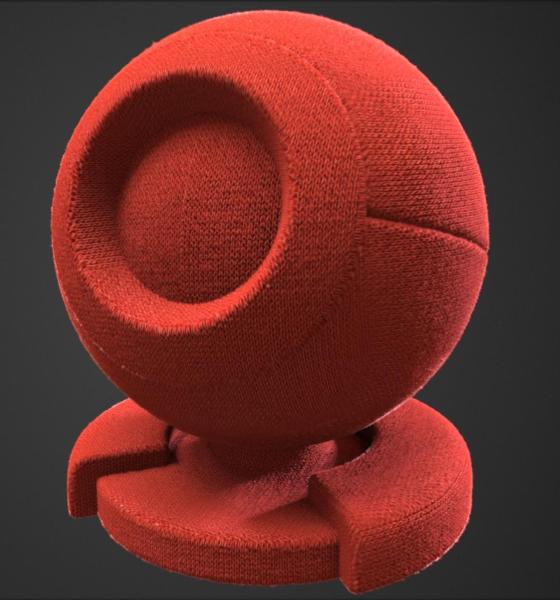
- Fabric materials scanned using Scanimat technology have been added.
- Added integration with Antigravity 2.0.
Other minor changes:
- Render only a single preview when saving the node graph
- Fixed baking nodes to sculpt object vertices
- Source selection in the Object Inspector (Layer or Object)
- Fixed component reordering in the Object Inspector
- Automatic conversion of Samplers to UVWTexture nodes in existing materials
- Per-channel inversion in image loading settings
- Automatic conversion of Samplers to InlineNodes
- Modified SingleVertexSelection usage
- Modified MultiObject::Tips()
- Fixed color conversion from LAW formats
- Updated Python API and API documentation
- Fixed shaders
- Added option to replace or add Displacement in the Mask node (Component type)
- Added support for screen-space reflections and lighting when rendering polygonal objects in the Render Room
- Added ability to create materials that control surface transparency (e.g., for game glass or low-poly model outline transparency)
- Restored missing tools for multi-resolution and proxy modes
- Added ability to invert individual channels in the Invert node
- Added Saturation node
- Removed Samplers from the SimpleMaterial node
- Fixed PBRTiler extension
3DCoat-2026-03 NS (Beta GPU Per-Pixel Painting)
May 27 2026
- Retopo/Modeling Room: Added option "Switching Pen Mode to Rectangle After the Select Transform Activated"
- New nodes are now created at the location where the right mouse button was clicked to invoke the menu—rather than at the location where the mouse cursor happened to be at the moment the node was created.
- The "Soft Displacement" property has been added. This is a displacement effect designed to be used in conjunction with a normal map: Soft Displacement shifts vertices without affecting shading, and its impact on shadows is reduced by half; the normal map is then used to define the orientation of each pixel, ensuring correct shading. This feature is crucial for creating high-quality fabric materials.
- Retopo/Modeling Room: "Polygon Tree" has been improved. Speed up work for large files.
- Retopo/Modeling Room: tool Cap - bug fixed and improvements.
- Node header default colors are now category-based (each category has its own distinct color).
- Normal Map Support in Node-Based Materials
- Fixed a crash that occurred while clearing the Node Graph in the Node Editor.
- Fixed selection of multiple nodes using a rectangle or CTRL.
- Added the ability to select multiple painting layers, move selected layers within the painting layer tree, and group, hide, unhide, duplicate, or delete them.
- In GPUPPP mode, layer masks affect based on brightness, rather than exclusively based on transparency.
- SoftDisplacement, combined with Sheen, can simulate fur, while FWSNormal defines its direction. To enable support for PPP texturing, "Show Displacement Mesh" must be enabled, and tessellation must be configured.
- A tool for extracting MicroprotrusionsColor based on pixel brightness has been added to the PBRTiler extension.
3DCoat-2026-02 (Alpha GPU Per-Pixel Painting)
Wed May 16 2026
- Checking compilation codes before setting up a node graph
- Retopo/Modeling Room: Gizmo position is updated after selecting a group in the list
- Objects created by C++ functions from Python scripts will not be garbage collected by Python, thus avoiding double freeing.
- Image reading and writing file formats can be replaced via Python extension
- Retopo/Modeling Room: Auto Extrude was removed if you use Select tool, with activated gizmo.
- Ability to make visible and hide individual node properties in the Object Inspector.
- RGBA Curves and Gradient Support in Nodes
- Fixed instability in collapse live booleans (with color) and in merge visible (when LB present)
- Directional Occlusion and Geometry Info map types added to the Light Baking Tool.
- Implemented a new non-blocking iterative anti-aliasing system for the 3DCoat viewport that activates automatically during idle periods.
- If layer mask assigned, on sculpt color layers for performance and memory optimization. Previously there was noise sometimes.
- Option in preferences for brush shape rendering: When need, Always, Never
- Retopo/Modeling Room: tool SmartRetopo - Improved vertex welding technology. Operation speed has been increased.
- Retopo/Modeling Room: tool Welding Vertexs - bug is fixed
- Retopo/Modeling Room: tool SmartRetopo - Automatically switches from Loft to Quad mode if the 1st and last spline points touch the mesh
- Retopo/Modeling Room: Bevel - polished a lot and profile shape was added.
- Retopo/Modeling Room: "Smart Hybrid Primitive" has been improved.
- Drag&drop for Polygon Tree -> Models palette supported
- Retopo->Curves/Strokes slice cut in curves tool works correctly, this makes the functionality of curves/strokes to be non-destructive and really close to strokes tool.
- Retopo/Modeling Room: "Polygon Tree" has been modified. Invisible item can be selected.
- Added the ability to select multiple drawing layers, move selected layers within the drawing layer tree, and group, duplicate, or delete them.
- Fixed selection of multiple nodes using a rectangle or CTRL.
- Normal Map Support in Node-Based Materials
- Node header default colors are now category-based (each category has its own distinct color).
- Retopo/Modeling Room: tool Cap - bug fixed and improvements.
- Retopo/Modeling Room: "Polygon Tree" has been improved. Speed up work for large files.
- The "Soft Displacement" property has been added. This is a displacement effect designed to be used in conjunction with a normal map: Soft Displacement shifts vertices without affecting shading, and its impact on shadows is reduced by half; the normal map is then used to define the orientation of each pixel, ensuring correct shading. This feature is crucial for creating high-quality fabric materials.
- New nodes are now created at the location where the right mouse button was clicked to invoke the menu—rather than at the location where the mouse cursor happened to be at the moment the node was created.
3DCoat-2026-01
Tue Feb 17 14:13:36 2026 +0200
- Better style of no-modal input, same color as UI in general, no windows-style OK button.
- Node source codes have been moved to the UserPrefs/Scripts/GPUNodes folder
- The node system has been updated to prevent links between incompatible properties. The material preview renderer has been updated. A button for inverting input channels has been added. Required maps, such as AmbientOcclusion and Curvature, are now automatically calculated. The ability to use input channel correction curves in the node source code has been added.
- Python on Windows has been moved to ProgramData, which avoids incorrect operation in some cases.
- Correct supports rendering
- New important UI feature! Press CTRL-F or use Popups->Search in UI to find and execute any accessible item in UI in the current room.
- In Curve subtool was Added Check "ShowPoints"
- Retopo/Modeling Room: Tool "Select Transform" has been modified
- Restored GROW tool depth on pressure dependency icon
- New SPACE menu approach (older may be got back from settings) - type to find tool quickly.
- Added a color selector extension based on QT.
- Fixed a crash when using cStr in Python, including in cIDE, the expression editor, and node source code.
- Retopo/Modeling Room: The tool "Delete Face/Edge" polished a lot. Pre-selected edges or faces are removed.
- Fixed crash in live booleans (when unghosting)
- Fixed too small-scaled STL-s import
- Eraser with CTRL works correctly on frozen area (ppp)
- Retopo/Modeling Room: The tool Welding has been improved.
- Sculpt Room: for tool "Blob" - "Do Filling" was sped up several times. For "Smart Hybrid".
- Sculpt Room: Tool "Blob". A new option for lasso placement has been added to the "Smart Hybrid".